
Is it Better to Rent or Buy a Modem and Router?

When it comes to saving money on your internet bill, one big question usually comes up: should you rent or buy your equipment, like a modem and router? It’s a decision that might seem small but can significantly impact your wallet, convenience, and internet experience.
To make things easier, we’ll break down everything you need to know. From understanding what modems and routers actually do, to weighing the pros and cons of renting versus buying, we’ve got you covered.
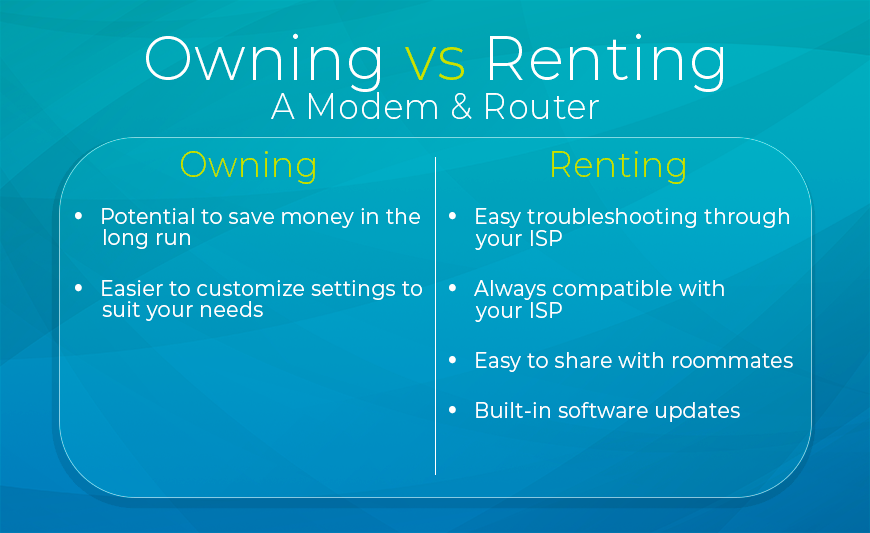
Key takeaways: renting vs. buying a modem and router
- ISPs typically charge $10–$20 per month to rent a modem, router, or gateway
- Buying your own equipment usually pays for itself within 12 months
- Renting offers convenience, guaranteed compatibility, and built-in ISP tech support
- Buying gives you better performance options, customization, and real long-term savings
- Fiber internet customers typically cannot replace the ISP’s ONT (optical network terminal), only the router
- The best choice depends on your ISP, your connection type, how long you plan to stay, and your comfort with technology
What does a modem and router actually do?
Before weighing the costs and savings, it helps to understand what each piece of equipment does in your home network set up.
Modem
A modem is the device that connects your home to the internet. It communicates with your ISP’s network and translates its signal into a usable internet connection.
Router
A router takes the connection from the modem and distributes it via Wi-Fi or Ethernet cables so that all devices on your network have internet connectivity.
Gateway
A gateway combines a modem and a router into one device. It is the most common type of equipment ISPs rent to customers, and it works well for most households. Some users prefer a separate router of their choosing for better performance and flexibility, plus the option for more wired connections, since gateways typically have only four Ethernet ports.
One important note for fiber customers: Fiber internet uses an ONT (Optical Network Terminal) that fiber providers have professionally installed in homes. Most ONT devices are proprietary and cannot be replaced with a consumer model. But you can pair any router you want with it.
The table below shows what each device type can handle, from basic functions to more advanced features.
| Capability | Modem | Router | Gateway |
| Connects to ISP | Yes | No | Yes |
| Converts signal for home use | Yes | No | Yes |
| Distributes Wi-Fi | No | Yes | Yes |
| Assigns local IP addresses | No | Yes | Yes |
| Parental controls | No | Advanced models | Yes |
| Guest network support | No | Yes | Yes |
| VPN support | No | Yes | Some |
| QoS (bandwidth prioritization) | No | Yes | Some |
| Mesh network support | No | Yes | Some |
| Firmware updates | Yes | Yes | Yes |
How much does it cost to rent a modem from your ISP?
ISPs typically charge between $10 and $15 per month for equipment rental. That’s $180 each year on hardware you will never own. Some ISPs advertise equipment as free or included, but it may be baked into the monthly plan rate. Read the details about equipment and fees from your provider to understand costs and inclusions.
Modem and router rental fees by major ISP
| ISP | Equipment fee | Notes |
| AT&T Fiber | $0 | Gateway included with most fiber plans |
| Xfinity | $0–$15/mo | Included on some plans; upgraded equipment costs extra |
| Spectrum | $5–$10/mo | Modem included; router rental is separate |
| Cox | $13–$15/mo | Varies by plan tier |
| Optimum | $10/mo | Standard gateway rental |
| EarthLink | Varies | Call 877-344-7193 for current equipment options |
Fees are subject to change. Verify current pricing with your provider before deciding.
What are the benefits of buying your own modem and router?
Buying your own modem and router is like an investment. You get full control, better customization options, and long-term savings. It does require a little homework up front, but it’s worth it if you’re willing to take ownership of maintenance and troubleshooting.
Save money over time
It’s pretty straightforward. For a $15 a month rental fee, you’ll hit the break-even point on a $150 modem purchase in about 10 months. After that, every month thereafter is money in your pocket.
| Time period | Rental cost ($15/mo) | Purchase cost (one-time $150) | Your savings |
| 12 months | $180 | $150 | $30 |
| 24 months | $360 | $150 | $210 |
| 36 months | $540 | $150 | $390 |
Over three to five years with the same ISP, you might save $300 to $500 or more, depending on your provider’s rental rate.
Better performance and customization
ISP-provided gateways are designed to serve a wide range of customers, so they are adequate for most needs but not ideal for all. When you own your equipment, you get to choose features like Wi-Fi 6 or Wi-Fi 7 support, mesh network compatibility, advanced QoS settings (traffic prioritization) for gaming or streaming, and better coverage for larger homes. Plus, if you move or switch providers, you can take your router with you.
What to look for when buying a modem or router
Doing the research now helps you get the equipment you need for your type of internet connection and how you use the internet. Here is what to check before you buy:
- For cable internet: Look for a DOCSIS 3.1 certified modem if you have a plan that’s 1 Gbps or faster. DOCSIS 3.0 works for lower-speed tiers but can be a bottleneck for higher-speed connections.
- For fiber internet: Focus on buying a quality router or Wi-Fi gateway to pair with the provider-owned ONT.
- Wi-Fi standard: Wi-Fi 6 is the current mainstream standard and handles most households well. Wi-Fi 7 is the emerging option for futureproofing.
- Speed compatibility: Make sure the modem’s maximum throughput matches your plan speed.
- ISP approval: Always check your ISP’s approved compatibility list before purchasing. Most providers publish these on their websites.
Before you buy
Taking the plunge means doing a bit of homework first:
- Confirm your ISP allows customer-owned devices; most do, and it is your legal right under federal law
- Research what specifications your ISP requires
- Understand that if something goes wrong with your hardware, troubleshooting falls on you, not your ISP
- Keep track of when upgrades or replacements are needed; modems typically last three to five years
What are the benefits of renting a modem or router from your ISP?
On the other hand, renting is a lot like subscribing to convenience. Your ISP handles the setup, troubleshooting, and upgrades. There is a monthly fee involved, but for many people the ease and peace of mind are worth every penny.
Convenience and easy troubleshooting
If anything goes wrong with your rented equipment, it is your ISP’s problem to solve. They can walk you through troubleshooting steps, run remote diagnostics, or send a technician to your home if needed. For anyone who does not enjoy Googling error codes in their spare time, that support is genuinely valuable.
Always compatible with your ISP
When you rent from your ISP, you never have to worry about whether your equipment will work with their network. Everything is certified and configured before it arrives at your door. If your ISP upgrades its technology, they update or replace your hardware at no extra cost to you.
Automatic updates and hardware replacements
Most ISPs manage firmware updates for rented equipment, though the frequency and reliability varies by provider. If a rented device simply stops working, the ISP typically replaces it at no additional charge under the rental agreement. You are not on the hook for a new purchase if the hardware dies.
When renting makes financial sense
Renting is not the wrong choice. It is just the right choice for specific situations. It makes the most sense when:
- You move frequently and owned equipment does not always transfer to a new provider.
- You are in a short-term rental or transitional living situation.
- You live with roommates and want to avoid ownership disputes over equipment if someone moves out.
- You are not comfortable troubleshooting networking hardware on your own.
- Your ISP includes equipment at no additional charge, in which case renting costs you nothing extra.
Comparing renting vs. buying a modem and router
Here’s a look at the costs of renting and buying side-by-side to get a quick idea of how each stacks up.
| Factor | Renting from your ISP | Buying your own |
| Monthly cost | $10–$20/mo ongoing | $0 after purchase |
| Upfront cost | None | $100–$200 typically |
| Tech support | Full ISP support included | Self-managed |
| Compatibility | Guaranteed by ISP | Must verify before buying |
| Firmware updates | Usually managed by ISP | Self-managed |
| Portability | Equipment stays with ISP | You keep it |
| Customization | Limited to ISP hardware | Full control |
| Best for | Renters, frequent movers, non-technical users | Long-term residents, performance seekers |
Does it make a difference if you have cable, fiber, or DSL?
Yes, and this is one of the most overlooked parts of the renting vs buying decision. The type of internet connection determines what equipment you can replace, and whether buying makes sense in the first place.
Cable internet
Cable internet customers have the most flexibility when it comes to buying their own equipment. There are many compatible modems available on the consumer market, and they can save you money in the long run. If your cable plan is 1 Gbps or faster, look for a DOCSIS 3.1 modem. (DOCSIS (Data Over Cable Service Interface Specification) is the technology behind data transmission for cable internet.) For slower speeds, DOCSIS 3.0 will work, but investing in a DOCSIS 3.1 model gives you room to grow if you upgrade your plan later.
Fiber internet
Unlike a modem, fiber internet requires an ONT (Optical Network Terminal) at your home, which belongs to the fiber provider. You cannot replace it. But you can buy your own router or Wi-Fi gateway and connect it to the ONT, which may perform better than provider-supplied hardware.
Some ISPs offer a gateway (ONT and router combined in one device) at no extra charge with most plans, which changes the financial math for buying a router.
DSL internet
DSL also uses a modem, and compatible models do exist at retail. That said, DSL is a declining technology with fewer buying options and lower potential savings given lower plan costs. If you are on DSL and considering a switch to a faster connection type, it may be worth waiting before investing in new equipment.
Renting vs. buying: which is right for you?
It really does come down to your lifestyle, your living situation, and how hands-on you want to be. Neither option is wrong, it depends on your situation and what you need.
You should probably buy if:
- You plan to stay with the same ISP for more than a year
- You want to maximize long-term savings on your internet bill
- You are comfortable doing a bit of research and light troubleshooting
- You want better Wi-Fi performance than a standard ISP gateway provides
- You have cable internet, where buying a modem is straightforward and widely supported
You should probably rent if:
- You move frequently or are in a temporary living situation
- Your ISP already includes equipment at no extra charge
- You prefer not to manage or troubleshoot your own hardware
- You have fiber internet and are weighing whether to replace just the router
- You share a home with people who might dispute equipment ownership later
No matter which route you choose, the most important thing is making sure you have the right internet plan to match your needs. If you want help deciding whether to rent or buy, or just want to find the best plan for your home, EarthLink’s internet experts are ready to help. Call 877-344-7193 today and let them walk you through your options.
Your internet experience should be fast, reliable, and set up in a way that works for you. Taking a few minutes to think through the equipment decision is a simple step toward getting there.
Frequently Asked Questions
Can I use my own modem with any ISP?
Not always. Compatibility depends on your ISP and your connection type. Most cable ISPs publish an approved equipment list on their website. Fiber customers cannot replace the ONT, but can replace the router connected to it.
How much can I save by buying my own modem?
At $10–$15 per month in rental fees, buying a $100–$150 modem can save you $200–$500 over three years, depending on your provider’s rate and how long you stay.
Do I have to return my modem when I cancel my internet service?
Yes. Rented equipment belongs to your ISP and must be returned when you cancel or switch providers. Failure to return it typically results in a non-return fee. Always get a receipt when you drop it off.
Will my ISP still provide tech support if I use my own modem?
Support varies by provider. Most ISPs will still help with service-level issues — such as an outage in your area — but may not troubleshoot hardware they did not provide.
What happens if my rented modem breaks?
Your ISP typically replaces it at no additional charge under the rental agreement. That is one of the genuine advantages of renting.
Is renting a modem ever free?
Some ISPs bundle equipment into the monthly plan cost. AT&T Fiber is one example. Always confirm whether the fee is truly waived or quietly folded into your bill before assuming you are getting a free ride
What is a gateway, and do I need one?
A gateway is a combined modem and router in one device. Most ISP rentals are gateways. You can also buy a gateway at retail, though many networking enthusiasts prefer separate devices for better performance and the ability to upgrade one component at a time.