Real fiber for $24.95.* Not ‘fiber-powered’ like the other guys. Call 866-618-0412.


The Ultimate Guide: Find the Right Internet Plan

Internet basics, defined
Our guide demystifies the internet, making it easier for you to comprehend and navigate. For a quick overview, read our summaries and links below.
For comprehensive details, download our interactive PDF and subscribe for further updates from EarthLink.
Internet for beginners: How the internet works
The internet is a vast and complex network that connects computers and other devices across the world, allowing them to communicate and share information. Understanding its basic functionality can be fascinating and is essential in our increasingly digital world.
The foundation of the internet: networking
At its heart, the internet is an ever-evolving collection of interconnected networks. These include private, public, academic, business, and government networks, all communicating through a standardized set of protocols.
IP Addresses
- Each device on the internet, from your smartphone to a server in a data center, has a unique Internet Protocol (IP) address. This address is crucial for ensuring information sent across the internet reaches the correct destination.
Data Transmission
Information on the internet is sent in small units called ‘packets’. Each packet is tagged with its destination IP address and traverses various routes across multiple networks to reach its target. This packet-switching method is fundamental to how the internet operates.
VPNs
A Virtual Private Network is an application that can keep your device and IP address private as you use the internet. Using a VPN replaces your real IP address with one from a different location. Its best uses are for protecting your identity, thwarting cyber criminals, connecting to public WiFi safely, and joining a secure server.
The role of servers and clients
The internet operates on a client-server model. Here's how it works:
Servers
These are powerful computers that store data and services. Websites are hosted on servers, making them accessible over the internet.
Clients
When you use the internet, your device acts as a client. When you access a website, your device (the client) sends a request to the website’s server. The server then responds with the requested web page
Connectivity: ISPs, routers, and more
The way we connect to the internet is as crucial as the internet itself. This connection is facilitated by a combination of service providers and essential hardware.
ISPs
Internet Service Providers (ISPs) are companies that provide you with access to the internet. They connect you to their network, which in turn is connected to the broader internet.
Routers and Modems
These devices play a crucial role in home networks. A modem connects your home network to the internet, while a router distributes the internet connection among the various devices in your home.
Not all ISPs are created equal and may not be available in your area. Join the largest provider of internet in the continental U.S. with EarthLink and get speeds that surpass other providers.
Key internet terms you should know
Get familiar with internet jargon with our internet glossary.
Gigs: Short for gigabytes, a unit of data storage or file size. One gigabyte equals 1,024 megabytes (MB).
Mbps: Megabits per second, a measure of internet speed. It indicates how fast data is transferred over the internet.
POPs: Points of Presence, locations where different networks can connect to one another over the internet.
WHI: Wireless Home Internet, A high-speed internet service that uses wireless cellular networks to provide internet access to homes, especially beneficial in areas without traditional wired services.
WiFi: A wireless networking technology that allows devices to connect to the internet without physical cables.
5G: The fifth generation of mobile network technology, offering faster speeds and more reliable internet connections on mobile devices.
Fiber Optics: Used by many ISPs, fiber optic cables use light to transmit data at incredibly high speeds over long distances. Known for its high bandwidth capacity and speed, it’s ideal for heavy internet usage and large data transfers, producing some of the fastest internet speeds on the planet.
Fixed Wireless: An internet service where a direct connection is made between a wireless base station and a customer’s location, using radio signals instead of cables. This type of internet is often leveraged for businesses that desire a private connection or redundancy. Learn more about fixed wireless here.
Cable/Broadband Internet: This type of internet is delivered through coaxial cables, the same as cable television. It offers high-speed internet access and is one of the most common forms of internet connections in urban areas.
Satellite Internet: Satellite Internet is a service provided through communications satellites. Ideal for rural or remote areas where other forms of broadband are not available.
DSL (Digital Subscriber Line): A type of internet connection that transmits data over traditional copper telephone lines. It’s widely available but often slower than cable or fiber-optic internet.
Choosing the right internet speed
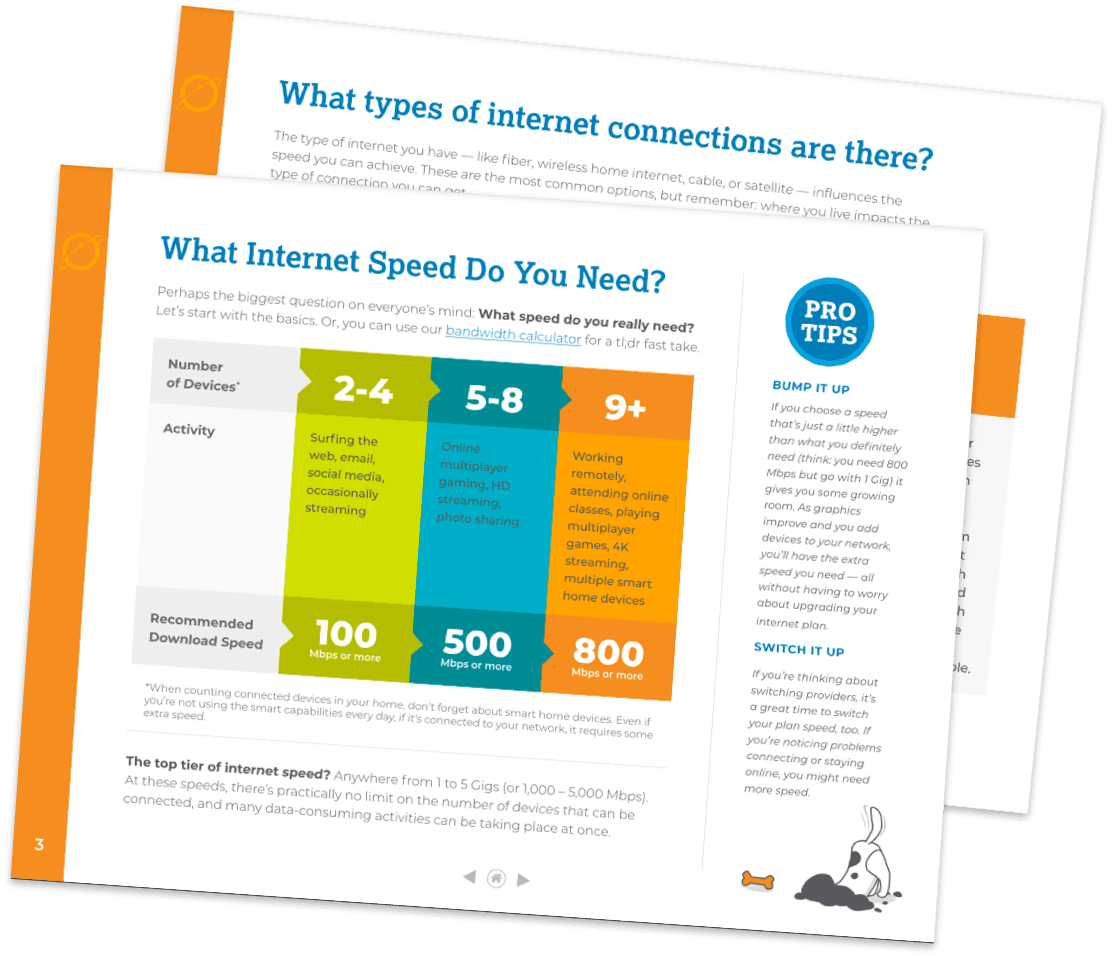
Selecting the right internet speed is crucial for a seamless online experience. Whether you’re casually browsing, engaged in heavy gaming, or working from home, the speed of your internet connection can make a significant difference. Here’s a general estimate of how much speed you might need given common activities on the internet.
Number of Devices* |
|---|
2 – 4 |
5 – 8 |
More than 9 |
Activity | Recommended Download Speed |
|---|---|
Surfing the web, email, social media, occasionally streaming | 100 Mbps or more |
Online multiplayer gaming, HD streaming, photo sharing | 500 Mbps or more |
Working remotely, attending online classes, playing multiplayer games, 4K streaming, multiple smart home devices | 800 Mbps or more |
Family guide to the internet
When it comes to keeping your family safe online, you want to be prepared. Kids today are using the internet at younger ages and adapting to the digital world faster than we expected. More than likely, your children use the internet just like you to communicate with friends, learn, and explore. Stay one step ahead of the game with our tips on safe internet usage for the whole family here.
Important links for deeper understanding
Enhance your understanding with our in-depth blog posts on more internet topics: